实现背景

假设要做openAI的大模型API封装,可以使用Spring WebFlux提供服务,利用其非阻塞、响应式编程模型来高效处理异步请求。

为什么要做API封装?

  1. 保护模型:避免直接暴露模型,保护模型的安全性。
  2. 降低耦合:将模型与业务逻辑分离,降低耦合度。
  3. 与原有的系统对接:将模型封装成API,方便与其他系统对接。

实现思路

以下是一个基于 Spring WebFlux 封装 OpenAI API 的完整实现例子,使用 Gradle 管理,项目目录结构为 vo、client 和 biz。

项目目录结构

1
2
3
4
5
6
7
8
9
10
11
12
13
14
15
16
src
└── main
├── java
│ └── com
│ └── example
│ ├── controller
│ │ └── OpenAIController.java
│ ├── biz
│ │ └── OpenAIService.java
│ ├── client
│ │ └── WebClientConfig.java
│ └── vo
│ ├── PromptRequest.java
│ └── CompletionResponse.java
└── resources
└── application.yml

配置 WebClient 类 (client/WebClientConfig.java)

WebClientConfig 用于配置 WebClient,这个类将负责与 OpenAI API 的连接。

业务逻辑 (biz/OpenAIService.java)

OpenAIService 类用于封装调用 OpenAI API 的逻辑,并且通过 WebClient 处理流式响应,返回 Flux<String>

数据传输对象 (DTO) (vo/PromptRequest.javavo/CompletionResponse.java)

PromptRequest.java:定义发送给 OpenAI API 的请求体数据结构。

CompletionResponse.java:定义从 OpenAI API 接收到的响应数据结构

数据传输对象

响应的数据结构

1
2
3
4
5
6
7
8
9
10
@Data
public class CompletionResponse {

private List<Choice> choices;

@Data
public static class Choice {
private String text;
}
}

private List<Choice> choices;CompletionResponse类中扮演以下几个重要角色:

  1. 表示响应中的数据结构:
  • choices 字段表示 OpenAI API 响应中的一个重要部分。根据 OpenAI API 的响应格式,生成的文本是以 choices 的形式返回的,每一个 Choice 对象包含一段生成的文本。
  1. 封装多个 Choice 对象:
  • 由于 OpenAI API 可以生成多个结果(多个选择),因此需要用 List 来封装这些生成的结果。List 是一个集合类,允许存储多个 Choice 对象,每个对象代表一个生成的文本。
  1. 将 JSON 映射为 Java 对象:
  • 当 OpenAI API 返回一个包含 choices 的 JSON 数组时,Spring WebFlux 的 WebClient 会将 JSON 映射为 Java 对象。List 对应的是 JSON 中的数组,Choice 类中的 text 字段对应 JSON 中每个选项的文本内容。

假设 OpenAI API 的响应如下:

1
2
3
4
5
6
7
8
9
10
11
Copy code
{
"choices": [
{
"text": "This is the first generated text."
},
{
"text": "This is the second generated text."
}
]
}

根据这个 JSON 结构:

choices 是一个数组(List),每个数组元素对应一个 Choice 对象。
Choice 对象中有一个 text 字段,存储生成的文本。
private List<Choice> choices; 在这里就是用来存储和处理这个数组,代表生成的多个文本结果。

在程序中的作用

当调用 OpenAI 的 API 并接收响应时,Spring 的反序列化机制会将 JSON 数据自动映射到 CompletionResponse 中。choices 字段将包含多个生成的文本,每个文本存储在一个 Choice 对象中。

可以通过以下方式访问生成的文本:

1
2
3
4
5
CompletionResponse response = ... // 从 API 获取响应
List<CompletionResponse.Choice> choices = response.getChoices();
for (CompletionResponse.Choice choice : choices) {
System.out.println(choice.getText()); // 输出每个生成的文本
}

这样,就可以逐个处理生成的文本结果。

请求的数据结构

1
2
3
4
5
6
7
8
9
10
11
12
13
/**
* 请求体,包含模型、提示词等
*/
@Data
public class PromptRequest {
private String model; // text-davinci-003 gpt-3.5-turbo code-davinci-002
private String prompt;
private int max_tokens;
private int temperature;
private int top_p;
private int n;
private boolean stream;
}

WebClient 配置

1
2
3
4
5
6
7
8
9
10
11
12
@Configuration
public class WebClientConfig {

@Bean
public WebClient webClient(WebClient.Builder builder) {
return builder
.baseUrl("https://api.openai.com/v1") // OpenAI API base URL
.defaultHeader("Authorization", "Bearer YOUR_API_KEY") // 替换为你的 OpenAI API Key
.defaultHeader("Content-Type", "application/json")
.build();
}
}

什么是 WebClient?

WebClient 是 Spring WebFlux 提供的一个响应式、非阻塞的 HTTP 客户端,允许应用程序与外部服务进行交互。相比于传统的 RestTemplate,WebClient 能更好地支持异步操作,特别适合处理高并发、低延迟的应用场景。

WebClient 允许我们以编程的方式发起 HTTP 请求并处理响应。可以发送 GET、POST、PUT、DELETE 等各种 HTTP 请求,且可以处理 JSON、XML 或其他格式的数据。

WebClient 的使用步骤

  1. 创建 WebClient 实例:通过 WebClient.Builder 创建 WebClient 实例,可以配置 baseUrlheader 等信息。
  2. 发起请求:使用 WebClient 实例发起请求,可以发送 GET、POST 等请求。
  3. 处理响应:通过 retrieve() 方法获取响应,可以处理响应数据。

示例

1
2
3
4
5
6
7
8
9
10
11
12
13
14
15
16
// 创建 WebClient 实例
WebClient webClient = WebClient.builder()
.baseUrl("https://api.example.com")
.build();

// 期望只返回一个结果(比如从 API 返回的单个 JSON 对象),使用 Mono 来处理
Mono<String> response = webClient.get()
.uri("/endpoint")
.retrieve() // 提取响应体
.bodyToMono(String.class); // 将响应体转换为字符串

// 期望返回多个结果(比如从 API 返回的 JSON 数组),使用 Flux 来处理
Flux<MyResponseObject> response = webClient.get()
.uri("/stream-endpoint")
.retrieve()
.bodyToFlux(MyResponseObject.class); // 将响应体映射为多个对象

处理响应

1
2
3
response.subscribe(res -> {
System.out.println("Response: " + res);
});

Mono 或 Flux:

Mono 和 Flux 是响应式编程模型中的核心部分,分别表示单个元素(Mono)或多个元素(Flux)的异步序列。

这些序列是“惰性”的,意味着它们不会在定义时立刻执行。只有当你“订阅”它们时,数据才会开始流动,或者说,操作才会被真正执行。
subscribe() 方法:

subscribe() 是触发响应式流的关键操作。当你调用 subscribe(),整个请求流程才会被激活和执行。

subscribe() 的参数是一个 Consumer,表示当有数据发出时,你可以定义如何处理这些数据。在这个例子中,res 就是 HTTP 响应体的结果。

假设和前端进行交互,controller如下

1
2
3
4
5
6
7
8
9
10
11
12
13
14
15
16
17
18
19
20
21
22
23
24
25
26
27
28
29
30
31
32
33
34
35
36
37
@RestController
@RequestMapping("/api/openai")
public class OpenAIController {

private final OpenAIService openAIService;

public OpenAIController(OpenAIService openAIService) {
this.openAIService = openAIService;
}

@PostMapping("/generate")
public SseEmitter generateText(@RequestBody PromptRequest request) {
SseEmitter emitter = new SseEmitter();

// 调用 OpenAIService,并逐步推送生成的文本内容
Flux<String> responseFlux = openAIService.generateText(request);

responseFlux.subscribe(
// 这是一个 Lambda 表达式,表示每当 Flux<String> 中有新的文本片段 result,服务器会执行这个代码块:
result -> {
try {
emitter.send(SseEmitter.event().data(result)); // 将生成的文本片段作为 SSE 事件发送到客户端。
} catch (Exception e) {
emitter.completeWithError(e); // 处理异常
}
}, // 每次 Flux 产生新文本段时,调用这个回调函数,将该段文本发送给客户端。
emitter::completeWithError, // 处理错误
emitter::complete // 完成
);
/*
* 客户端发送请求后,服务器返回一个 SseEmitter 对象,告诉客户端这将是一个持续的数据流。
* SseEmitter 用于推送多次数据(在文本逐步生成的过程中)。
* 当推送完毕后,SseEmitter 会通过 complete() 方法关闭连接。
*/
return emitter;
}
}

SseEmitter

SseEmitter 是 Spring 提供的一个类,用于处理 Server-Sent Events (SSE),一种服务器端推送技术。
通过 SseEmitter,服务器可以持续向客户端发送事件,而客户端只需要建立一次连接即可接收多个事件。
SSE 是基于 HTTP 协议的持久连接,这使它在实时数据更新场景中非常有用,例如股票价格、社交媒体通知、实时聊天消息等。

服务类 (biz/OpenAIService.java)

  • 连接是单向的,服务器推送数据,客户端接收数据。
  • 客户端通过 EventSource API 来接收服务器推送的事件。
1
2
3
4
5
6
7
8
9
10
11
12
13
14
15
16
17
18
19
20
21
22
23
@Service
public class OpenAIService {

private final WebClient webClient;

public OpenAIService(WebClient webClient) {
this.webClient = webClient;
}

/**
* 提供给其他组件调用,发送请求到 OpenAI API 并流式返回结果
* @param promptRequest 请求体,包含模型、提示词等
* @return Flux<String> 返回流式响应的每一部分
*/
public Flux<String> generateText(PromptRequest promptRequest) {
return webClient.post()
.uri("/completions")
.bodyValue(promptRequest)
.retrieve()
.bodyToFlux(CompletionResponse.class) // 将响应映射为 CompletionResponse 对象
.flatMap(response -> Flux.just(response.getChoices().get(0).getText())); // 获取响应的文本部分
}
}

其他的组件如何调用这个服务类?

1
2
3
4
5
6
7
8
9
10
11
12
13
14
15
16
17
18
19
20
21
22
23
24
25
26
27
28
29
30
package com.example.anothercomponent;

import com.example.biz.OpenAIService;
import com.example.vo.PromptRequest;
import org.springframework.stereotype.Component;
import reactor.core.publisher.Flux;

@Component
public class AnotherComponent {

private final OpenAIService openAIService;

public AnotherComponent(OpenAIService openAIService) {
this.openAIService = openAIService;
}

public void processPrompt() {
PromptRequest promptRequest = new PromptRequest();
promptRequest.setModel("text-davinci-003");
promptRequest.setPrompt("Explain quantum physics in simple terms.");
promptRequest.setMax_tokens(150);

Flux<String> responseFlux = openAIService.generateText(promptRequest);

responseFlux.subscribe(response -> {
// 处理每一个返回的文本块
System.out.println("Generated Text: " + response);
});
}
}

更为简答的实现方式,不需要显式订阅

直接返回ServerSentEvent<String>对象,Spring MVC 会自动将这个对象转换为 SSE 响应。

1
2
3
4
5
6
7
8
9
10
11
12
13
14
15
16
@RestController
@RequestMapping("/proxy")
public class SSEProxyController {

private final WebClient webClient = WebClient.create();

@GetMapping(value = "/stream", produces = MediaType.TEXT_EVENT_STREAM_VALUE)
public Flux<> proxySSE() {
return webClient.get()
.uri("http://localhost:8081/source-sse") // 外部 SSE 服务地址
.accept(MediaType.TEXT_EVENT_STREAM)
.retrieve()
.bodyToFlux(String.class)
.map(data -> ServerSentEvent.builder(data).build());
}
}

前端如何使用

1
2
3
4
5
6
7
8
9
const eventSource = new EventSource('/api/openai/generate');
eventSource.onmessage = function(event) {
console.log("Received data: ", event.data);
// 在这里处理接收到的文本数据
};
eventSource.onerror = function(event) {
console.error("Error occurred: ", event);
// 在这里处理错误
};

SseEmitter对象

SseEmitter 是 Spring 提供的一个类,用于处理 Server-Sent Events (SSE),一种服务器端推送技术。通过 SseEmitter,服务器可以持续向客户端发送事件,而客户端只需要建立一次连接即可接收多个事件。
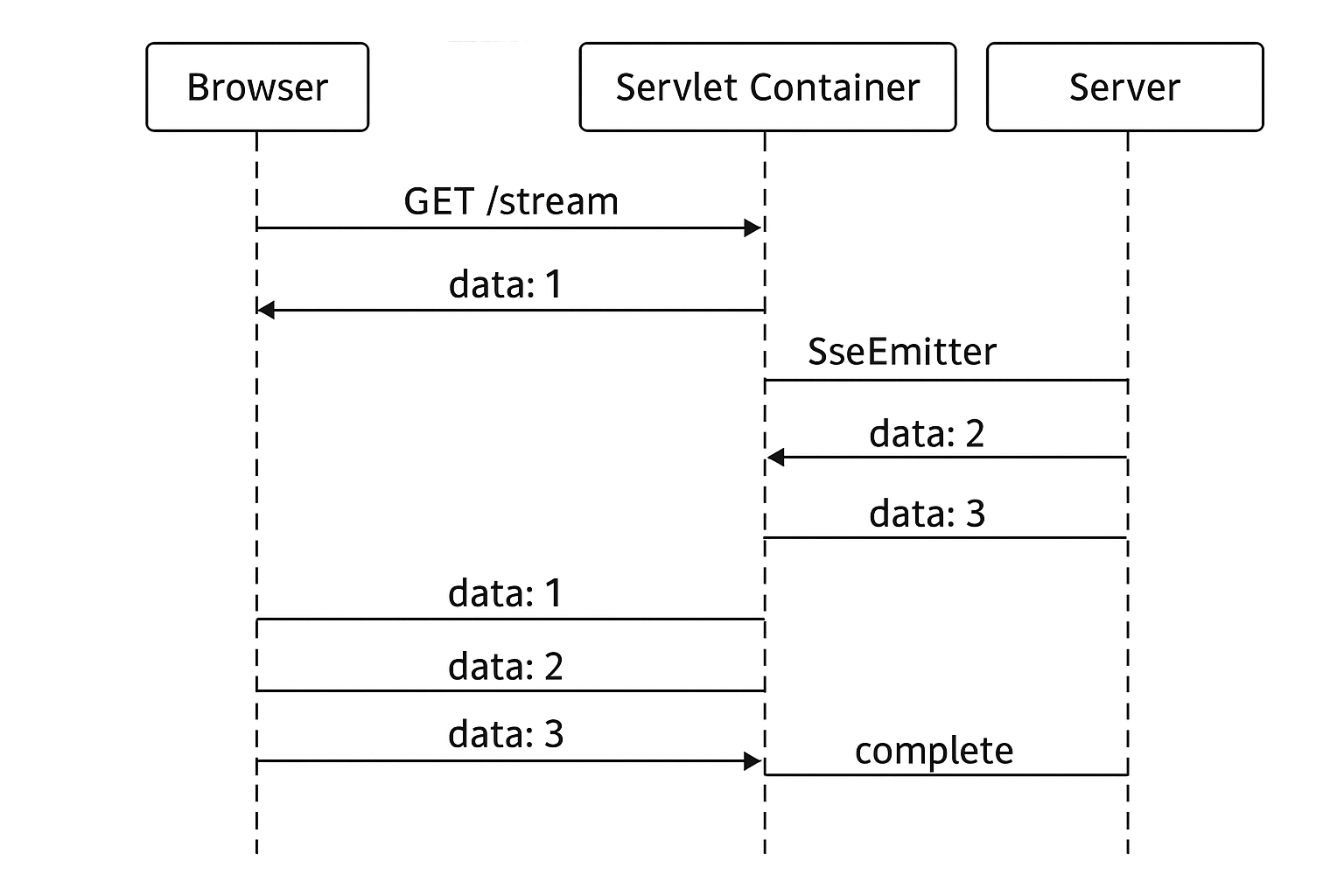
在 Java 里,SseEmitter(Spring MVC 提供的 SSE 对象)之所以能流式返回,本质上是利用了 HTTP 长连接 + 分块传输(Chunked Transfer Encoding) 来实现的。

我给你拆开解释一下原理:


1. SSE 是什么

  • SSE(Server-Sent Events)就是浏览器向服务器发起一个 HTTP 请求
  • 服务器不立刻关闭连接,而是不断 分批发送数据 给浏览器。
  • 客户端(通常是浏览器 EventSource)会不断接收这些数据并触发事件。

SSE 是单向的(服务器 → 客户端),不像 WebSocket 那样双向通信。


2. SseEmitter 的实现原理

Spring 通过 SseEmitter 让你轻松用 Java 写 SSE 服务。

关键点:

  • 底层用的是 Servlet 异步处理AsyncContext

  • HTTP 头里会返回:

    1
    2
    3
    Content-Type: text/event-stream
    Cache-Control: no-cache
    Transfer-Encoding: chunked
  • Transfer-Encoding: chunked 让服务器可以分段写数据到 TCP 流,而不用等到一次性写完。

  • 每次你调用:

    1
    emitter.send(SseEmitter.event().data("hello"));

    Spring 会:

    1. "data: hello\n\n" 格式的数据写入响应流(OutputStreamWriter
    2. 不关闭响应流
    3. 立即 flush(),让客户端立刻收到这一段数据
  • 连接保持打开状态,直到:

    • 你调用 emitter.complete()(手动结束)
    • 或超时/异常

3. 流式的关键:不关闭 & 立即 flush

传统的 HTTP 响应是:

  1. 服务器生成完整内容
  2. 一次性写入响应流
  3. 关闭连接

SSE 则是:

  1. 打开连接(HTTP 长连接)
  2. 写一部分数据(flush 立即发出)
  3. 等待一段时间,再写下一部分数据
  4. 重复,直到结束

4. 一个例子

1
2
3
4
5
6
7
8
9
10
11
12
13
14
15
16
17
18
19
20
@GetMapping("/stream")
public SseEmitter stream() {
SseEmitter emitter = new SseEmitter(0L); // 0 表示不过期

new Thread(() -> {
try {
for (int i = 0; i < 5; i++) {
emitter.send(SseEmitter.event()
.name("message")
.data("第 " + (i+1) + " 条数据"));
Thread.sleep(1000); // 模拟延迟
}
emitter.complete();
} catch (Exception e) {
emitter.completeWithError(e);
}
}).start();

return emitter;
}

客户端

1
2
const es = new EventSource("/stream");
es.onmessage = (event) => console.log("收到:", event.data);